Back to Skills
Photo to Pixel Art
SZSaihhold Zhao

Photo to Pixel Art

AI Image Generation Skill

Transform any photo into nostalgic 8-bit, 16-bit, or modern indie game pixel art.

Updated Oct 12, 2026

See it in action

Real Photo to Pixel Art conversations, from the request to the finished result.

Example 1

SZSaihhold Zhao

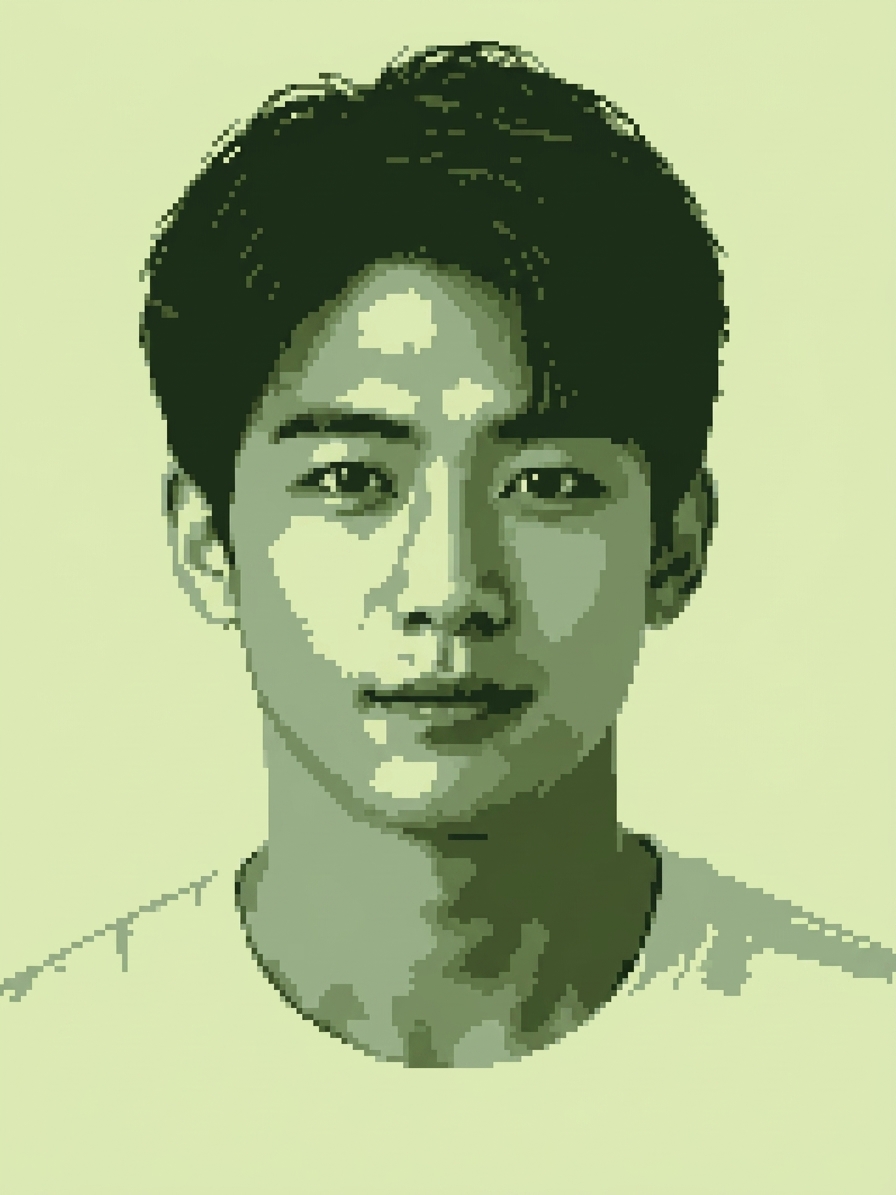
A portrait photo of a young man was converted into retro Game Boy monochrome pixel art, rendered in classic 4-shade olive green tones with crisp, flat shading.

Input

Front-facing portrait photo of a young East Asian man with short dark hair wearing a white crew-neck shirt against a plain white background.

Result

Monochrome 8-bit pixel art portrait of the young man rendered in four shades of olive green reminiscent of a classic Game Boy LCD screen.

Agent creation process

Choose your preferred pixel art aesthetic for the portrait conversion:

Saved

Pixel Art Style

Game Boy Monochrome

Shading & Texture

Clean Flat Pixels
Example 2

SZSaihhold Zhao

A photo of a golden retriever puppy holding a yellow tulip was transformed into authentic 8-bit NES-style pixel art with clean, flat shading.

Input

A golden retriever puppy sitting outdoors on stone tiles holding a single yellow tulip in its mouth.

Result

8-bit NES retro pixel art rendition of a golden retriever puppy holding a yellow tulip in its mouth.

Agent creation process

Choose your preferred pixel art aesthetic to transform your puppy photo:

Saved

Pixel Art Style

8-Bit Retro NES

Shading & Dithering

Clean Flat Pixels

About

Upload any portrait, pet snapshot, landscape, or everyday object to convert it into iconic video game aesthetics. You can customize the look by selecting from classic 8-bit NES, vibrant 16-bit arcade, detailed 32-bit modern indie, or retro Game Boy monochrome palettes.

PoloX preserves your image's original composition while rendering authentic square pixels, custom dithering textures, and nostalgic console color grading.

Workflow

  1. Upload your reference photo

    Provide any photo of a person, pet, cityscape, or object you want to transform into retro pixel art.

  2. Choose your console aesthetic

    Pick your favorite retro style, from chunky 8-bit NES and 16-bit SNES to modern indie pixel art or olive Game Boy tones, along with your preferred dithering texture.

  3. Generate pixel art graphics

    PoloX converts your photo into crisp, authentic pixel art using Nano Banana 2, applying clean square pixel grids, custom palette constraints, and retro lighting.

  4. Download your retro artwork

    Receive your finished pixel art screenshot ready to save, share, or use as an avatar or game asset.

Model
Inputs
Image, text
Output
Image · 1K, 2K, 4K
Fixed by skill
Resolution 1K

Frequently asked questions

How to convert a photo into pixel art?

Upload the photo you want to convert into the chat. Next, choose your preferred pixel art style and dithering level from the provided options. The skill then processes your image and generates a retro game pixel art version based on your selections.

What does the Photo to Pixel Art skill do?

This skill transforms uploaded photos of people, pets, landscapes, or objects into retro video game pixel art. You receive a newly generated pixel art image matching the composition and lighting of your original reference photo.

What image formats can I upload?

You can upload reference images in JPEG, PNG, or WEBP format. Each file can be up to 30MB.

What retro game styles can I choose from?

You can select from four visual styles: 8-Bit Retro NES, 16-Bit Arcade & SNES, 32-Bit Modern Indie, or Game Boy Monochrome. You can also pick between Clean Flat Pixels for solid fills or Textured Dithering for cross-hatch shading.

How many credits does it cost to generate pixel art?

Each image generation costs 1 credit at 1K resolution.

What happens if an image generation fails?

If a generation fails, the credits charged for it are automatically returned to your credit balance.

Can I use the generated pixel art for commercial projects?

You may use content you generate for commercial purposes, subject to the Terms and applicable law. However, content involving a real person's likeness must not be used in advertising, promotional materials, or other commercial contexts without verified written consent.

See more Fun skills