Back to Skills
SZSaihhold Zhao

Toc Toc Dance AI

AI Video Generation Skill

Turn any portrait or pet photo into a viral synchronized Toc Toc dance video in your chosen setting.

Updated Oct 10, 2026

See it in action

Real Toc Toc Dance AI conversations, from the request to the finished result.

Example 1

SZSaihhold Zhao

A portrait of a young man with pink-streaked hair was transformed into a synchronized Toc Toc dance video set on a tropical sunset beach.

Input

Portrait of a young East Asian man with pink-highlighted wavy hair, wearing a black coat and turtleneck.
Reference video demonstrating the synchronized Toc Toc dance choreography.

Result

Man performing the Toc Toc dance routine on a wet sandy beach at sunset.

Agent creation process

Let's customize your Toc Toc dance video! Choose the background setting and output resolution for the video.

Saved

Background Scene

Tropical Sunset Beach

Resolution

480P (SD)
About

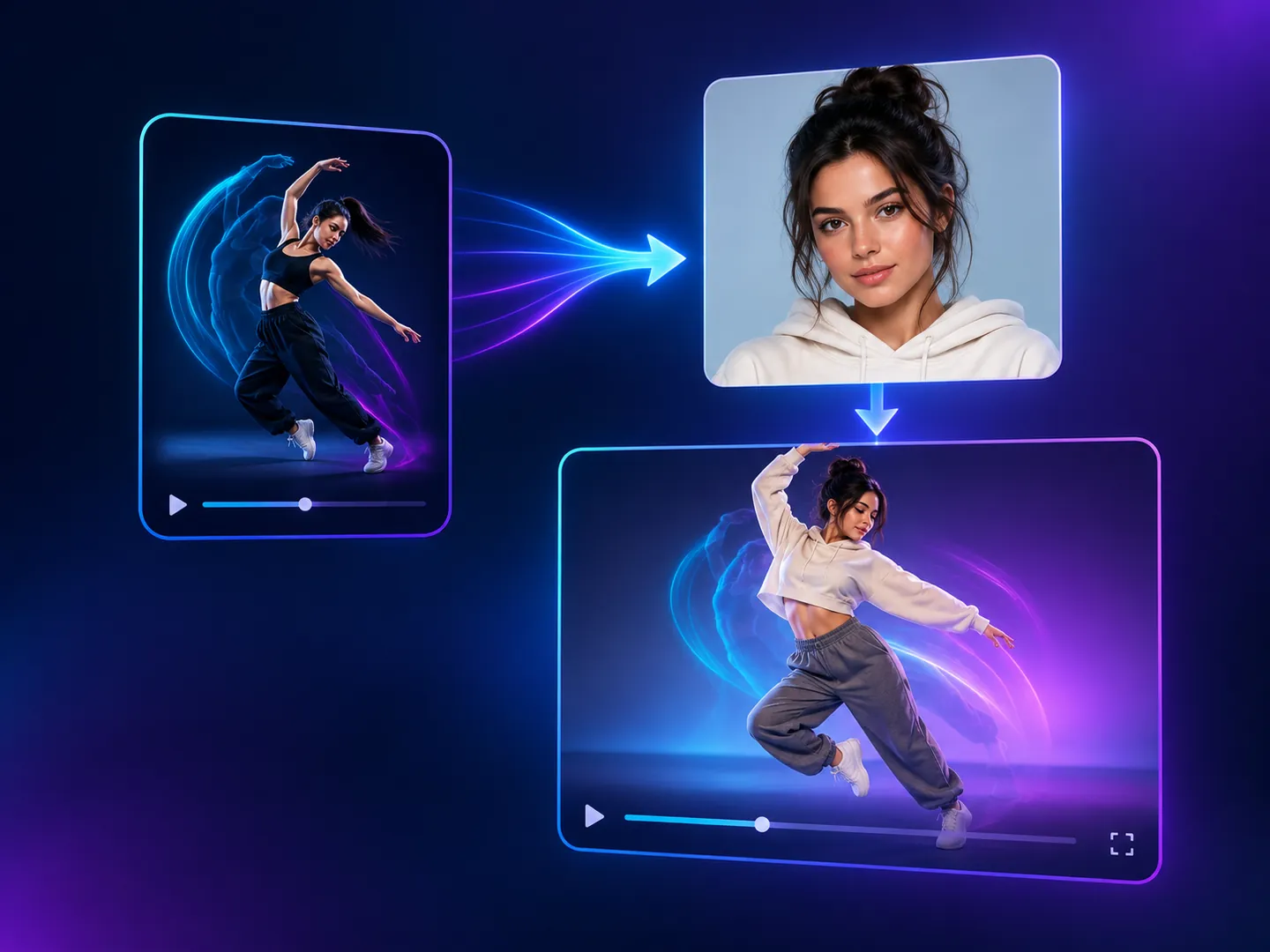
Upload a single photo of any person or pet to watch them take center stage in an energetic dance routine. Choose your favorite background environment and video resolution to customize the entire performance.

PoloX preserves your subject's authentic features and attire while faithfully transferring choreography and matching music into a polished 9:16 vertical video.

Workflow

  1. Upload your subject photo

    Provide a clear portrait of a person or pet to star in the dance routine.

  2. Choose background and resolution

    Pick an iconic scene like Times Square, a neon alley, or a sunset beach, and choose your preferred video quality.

  3. Generate synchronized dance video

    Wan 3.0 animates your subject with full choreography, synchronized audio, and tailored environment lighting in 9:16 format.

  4. Receive your viral clip

    Preview and download your finished 11-second dance video ready for sharing on mobile and social channels.

Model
  • Wan 3.0: 1–39 credits per video (480P · 2s to 1080P · 30s)
Inputs
Image, video or audio reference, text
Output
Video · 480p, 720p, 1080p · 2–30s
Fixed by skill
Aspect ratio 9:16 · Audio on · Duration 11s

Frequently asked questions

How to make a Toc Toc dance video from a photo?

Upload a single photo of a person or a pet to start the process. Next, choose your preferred background scene or enter a custom setting, and select your desired output resolution. The skill will then generate an 11-second vertical dance video with synchronized audio and choreography matching the reference dance routine.

What does Toc Toc Dance AI create?

It generates an 11-second viral Toc Toc dance video in vertical 9:16 format complete with synchronized audio. Your uploaded subject, whether a person or a pet, performs the energetic dance moves inside the background scene you choose.

What inputs are required to use this skill?

You must provide exactly one photo of a human or pet. The underlying model accepts JPEG, PNG, WEBP, or BMP image files up to 20MB.

What scene settings and resolutions can I choose from?

You can choose preset scenes such as Times Square, Neon Cyberpunk Alley, Tropical Sunset Beach, Grand Palace Ballroom, or specify your own custom location. For video resolution, you can choose 1080P, 720P, or 480P.

Can I change the video length or aspect ratio?

No, the duration is locked to 11 seconds to match the reference dance routine, and the aspect ratio is fixed to 9:16 for vertical mobile viewing.

What happens to my credits if a generation fails?

If a generation fails, the credits charged for it are automatically returned to your credit balance.

Can I use the generated dance videos commercially?

You may use content generated on PoloX AI for commercial purposes, subject to the Terms and applicable law. However, content involving a real person's likeness must not be used in advertising, promotional materials, political campaigns, or any other commercial context without verified written consent.

See more Fun skills