Back to Skills
Eye Color Changer
SZSaihhold Zhao

Eye Color Changer

Edit Color of Eyes in Any Portrait Photo

AI Image Generation Skill

Select custom shades or realistic tones to edit color of eyes while preserving natural iris details.

Change eye and iris colors in any portrait photo with natural textures or custom shades.

You can edit color of eyes on any clear portrait without altering facial features, skin tone, or lighting. The eye color editor modifies the iris layer while retaining reflections, pupils, and corneal catchlights. Pick matching shades or apply heterochromia across individual eyes.

Updated Oct 9, 2026

See it in action

Real Eye Color Changer conversations, from the request to the finished result.

Example 1

SZSaihhold Zhao

A studio portrait of a young man was edited to create realistic heterochromia, changing his natural brown eyes to emerald green on the right and sapphire blue on the left while preserving his original features.

Input

Studio portrait of a young Asian man with dark brown eyes, black hair, and a white t-shirt against a white background.

Result

Studio portrait of the same young man edited with two-tone heterochromia, featuring an emerald green right eye and a sapphire blue left eye.

Agent creation process

Choose your preferred eye color and styling for the portrait:

Saved

Eye Targeting

Heterochromia (Two-tone)

Iris Color

Vivid Emerald Green
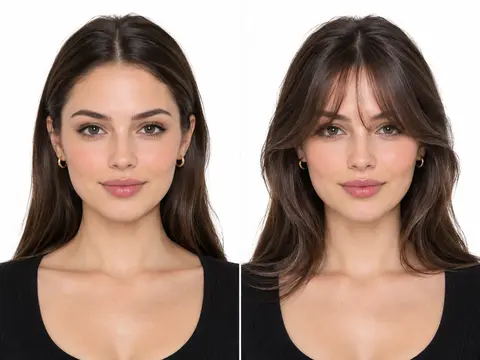
How to Change the Color of Eyes in a Portrait

Begin by uploading a portrait photo with clearly visible eyes. The eye color changer lets you choose whether to modify both irises uniformly or select distinct shades for each eye. Select from preset shades such as sapphire blue, emerald green, warm amber, amethyst violet, and ice gray, or input a custom hue.

Preserving Likeness and Natural Eye Reflections

Modifications target only the iris coloration, keeping facial geometry, eyelashes, eyelids, and makeup untouched. The tool retains limbal ring definition, pupil sharpness, and specular catchlights from the original lighting. The resulting portrait preserves your personal identity while displaying the new tone.

Options for Heterochromia and Custom Palettes

You are not limited to matching irises. The system provides dedicated controls for complete heterochromia, enabling one green eye and one blue eye. You can also bypass presets entirely and specify personal color preferences to achieve the exact look you want.

About

Upload any close-up portrait or selfie and reimagine eye colors with photorealistic iris textures and reflections. You can apply matching tones across both eyes or configure unique colors for each eye.

PoloX preserves your facial features, skin details, lashes, and lighting completely intact, returning an edited portrait with lifelike corneal catchlights and smooth blending.

Workflow

  1. Upload your portrait

    Provide a clear portrait photo or selfie with visible eyes, specifying the subject if multiple people are in the frame.

  2. Select eye targeting and shades

    Choose whether to recolor both eyes or create heterochromia, then pick curated tones like sapphire blue or amber, or set custom colors.

  3. Generate photorealistic eye textures

    PoloX renders the custom iris hues with natural fibrous striations, limbal rings, and glossy specular reflections while keeping facial identity identical.

Model
Inputs
Image, text
Output
Image · 1K, 2K, 4K
Fixed by skill
Resolution 1K · Aspect ratio auto

Frequently asked questions

Can I use AI to edit color of eyes in a photo?

Yes. This skill uses an image-to-image workflow to change iris hues while keeping your skin texture, facial structure, eyelashes, and natural reflections unchanged.

How can I change the color of my eyes in a photo?

Upload a selfie or portrait with clear eye visibility. Choose whether you want both eyes to match or prefer two distinct colors, pick your target iris shade, and start the generation.

Can I use an eye color filter for two different eye colors?

Yes. You can select the heterochromia option to assign different colors to the left and right eyes separately, such as sapphire blue on one side and emerald green on the other.

What kind of photos work best with this skill?

You need to upload a portrait photo or selfie where the eyes are clearly visible. Supported image formats include JPEG, PNG, or WEBP up to 30MB in size.

How many credits does it cost to change eye color?

Each image generation costs 1 credit at the 1K resolution setting used by the skill.

What happens if an image generation fails?

If a generation fails, the credits charged for it are automatically returned to your credit balance.

Can I use the edited portraits commercially?

You may use generated content commercially, but content involving a real person's likeness must not be used in advertising, promotional materials, political campaigns, or other commercial contexts without verified written consent.

See more Fun skills

PoloX AI is an AI creative workspace: chat with agents and work on an infinite canvas to generate images and videos, edit text in images, remove backgrounds, and more.

© 2026 PoloX AI. All rights reserved. polox.ai is a sub-brand of Vision Forge Co., Ltd.

VISIONFORGE CO., LTD — Registered address: 30 N GOULD ST STE R Sheridan, WY 82801.